Global Talent Visa Evidence Documents: How to Choose the Right 10 (Step by Step)
Global Talent Visa evidence documents: learn the 10-document limit, how to score evidence, map it to criteria and pick the best 10. Try our free check.

In this article
- What Are the Global Talent Visa Evidence Documents Rules?
- Why Does the 10-Document Limit Matter?
- A 4-Step Method to Choose the Right 10
- Step 1: Inventory Everything You Have
- Step 2: Score Your Global Talent Visa Evidence Documents
- Step 3: Map Items to Criteria
- Step 4: Choose and Cut
- What Counts as Evidence and What Does Not
- Which Documents Fit Which Criterion?
- What If You Do Not Have 10 Strong Documents?
- Illustrative Example (Fictional): Scoring Three Items
- Worked Allocation: A Fictional Set of 10 Documents
- Formatting Rules for Global Talent Visa Evidence Documents
- Where the CV and Letters Fit
- Illustrative Example (Fictional): A Two-Line Caption
- How Long Does Choosing Your Evidence Take?
- Common Mistakes When Choosing Global Talent Visa Evidence Documents
- Global Talent Visa Evidence Documents FAQ
- Your Next Step
- How We Checked This Article
Global Talent Visa evidence documents are limited to 10 pieces, each up to 3 A4 sides. You need at least 2 per criterion, and you cannot reuse one document for two criteria. The best method is to list everything you have, score it, map it to criteria, then choose.
This guide is for applicants who have more proof than space. It gives you a repeatable way to decide what goes in, what stays out and why.
Key takeaways
- You can submit up to 10 evidence documents, each up to 3 A4 sides.
- You need at least 2 documents for the mandatory criterion and 2 for each optional criterion you claim.
- One document cannot count towards two criteria.
- Your CV and recommendation letters do not count towards the 10.
- Score each item on independence, impact, recency, specificity and verifiability before you choose.
- Ten focused documents beat ten padded ones, so cut anything weak.
What Are the Global Talent Visa Evidence Documents Rules?
The core rules are a cap of 10 documents, 3 A4 sides each, and at least 2 documents per criterion. The gov.uk guidance on documents sets these out for digital technology applicants.
Here is how the pieces fit together.
| Rule | What it means |
|---|---|
| Up to 10 documents | Your total evidence set, not counting the CV or letters |
| Up to 3 A4 sides each | Every document has the same page limit |
| At least 2 for the mandatory criterion | Shows you are a leading or emerging talent |
| At least 2 per optional criterion | You need 2 of the 4 optional criteria |
| No reuse | One document cannot serve two criteria |
The CV and the three recommendation letters sit outside the 10. For that reason, many applicants feel the cap is tight but fair.
What about the minimum?
Add up the minimum and you get 6 documents. That means 2 for the mandatory criterion, plus 2 each for two optional criteria. The other 4 slots are spare capacity you can place where your case is strongest.
Why Does the 10-Document Limit Matter?
The limit matters because it forces choices, and the panel sees only what you pick. Tech Nation's independent panel decides overall. If a weak document takes a slot, a strong one cannot.
Tech Nation also says it cannot review your documents before you submit. So the choice is yours alone. A clear method stops you from picking by habit, and it helps when you doubt a choice.
Quality over count
Using all 10 slots is not a goal in itself. Tech Nation's guidance warns about vague, outdated or unverifiable documents. It says these weaken an application. Filling slots with padding can lower the average strength of your set.
A 4-Step Method to Choose the Right 10
The method is simple: inventory, score, map, then choose. It is our own working method, not an official Tech Nation process. Applicants in this situation often find it easier to defend each choice afterwards.
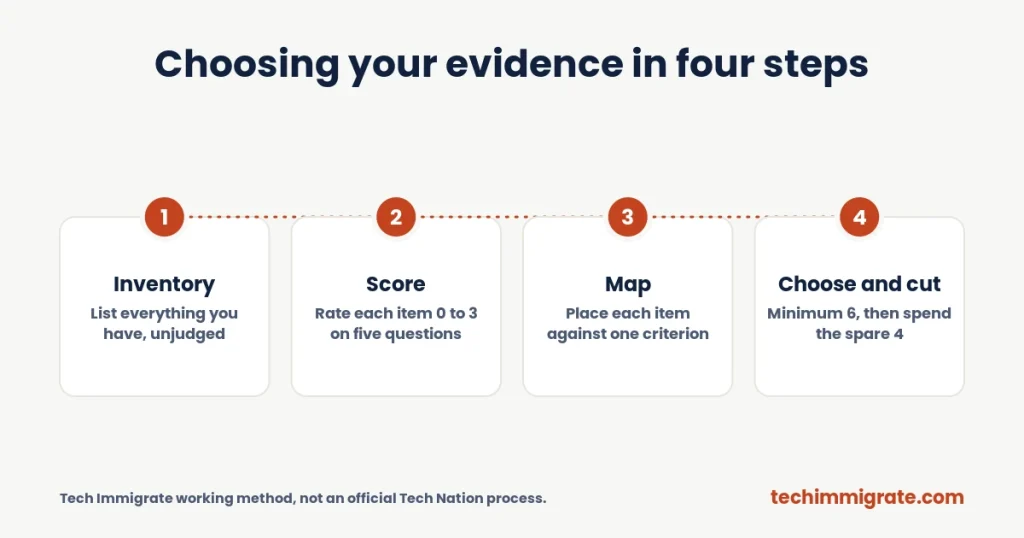
Each step below takes a short session. Once you finish them, you will have a ranked shortlist instead of a messy folder.
Step 1: Inventory Everything You Have
Step 1 is to list every possible document without judging it. Open a spreadsheet and add one row per item. Include things you think are weak, because you may find a use for them later.
Look in these places:
- Press, blogs and podcasts that mention you or your work
- Talks, panels and conference programmes
- Open source repositories and package download pages
- Product launch pages and customer case studies
- Awards, shortlists and competition results
- Employment letters, contracts and performance reviews
- Patents, papers and peer review records
What to record for each item
Add the date, the source, who produced it and which of your claims it proves. Also note the page count, because you cannot go over 3 A4 sides.
For code and platforms, our guide to GitHub evidence for the Global Talent Visa shows how to present public repositories as documents.
Step 2: Score Your Global Talent Visa Evidence Documents
Step 2 is to score every item on five questions. Use a simple scale from 0 to 3, where 3 is strongest. Here are the five questions.
- Independence: Did someone outside your employer produce it?
- Impact: Does it show a result, not only an activity?
- Recency: Does it fall within the last five years?
- Specificity: Does it name numbers, dates, products or people?
- Verifiability: Could a stranger check it without your help?
A scoring table
| Score | Meaning |
|---|---|
| 0 | Fails the test, or the test does not apply |
| 1 | Weak: vague, old or self-reported |
| 2 | Solid: clear, with some outside backing |
| 3 | Strong: independent, specific and checkable |
Add the five scores. If you use a 0 to 3 scale on five questions, the top total is 15. A total of 12 or more is a strong candidate, while a total under 7 usually belongs in the "leave out" pile. Those cut-offs are our own rule of thumb, not an official score.
Step 3: Map Items to Criteria
Step 3 is to place each scored item against the criterion it best proves. Remember, one document serves only one criterion. If an item could fit two, decide which criterion needs it more.
The mandatory criterion needs recognition as a leading or emerging talent. The four optional criteria cover innovation, recognition outside your day job, significant contribution to a product-led business, and academic contributions. Our criteria guide explains each one in detail.
Pick your two optional criteria
Count your strong items under each optional criterion. Choose the two where you have at least two strong, independent documents. Applicants in this situation often find that one criterion is clearly the best, while the second takes some thought.
Step 4: Choose and Cut
Step 4 is to select the final set, starting with the minimum of 6 and then spending the spare 4 slots. Place each spare slot where it adds the most proof, instead of where it adds the most pages.
After that, check the full set against the rules. Is every document within 3 A4 sides? Does every criterion have at least 2 documents? Is any document used twice?
Spend spare slots with care
The 4 spare slots are where applicants often differ most. Some add a third document to the mandatory criterion, since recognition is the heart of the case. Others add depth to an optional criterion where one document does most of the work.
Both choices can be sound. The right one depends on where your proof is thinnest, so look at your scores before you decide. Then write down why each spare slot sits where it does, which makes the set easier to defend.
The cut test
For each remaining item ask one question: "If I removed this, would the panel lose any proof?" If the answer is no, cut it.
What Counts as Evidence and What Does Not
Strong evidence is independent, specific and recent, while weak evidence is vague, internal or self-reported. Tech Nation's guidance names vague letters, outdated material and unverifiable claims as problems.
Tech Nation's rules also say internal awards do not count towards recognition. LinkedIn or Medium posts on their own do not count either. Evidence should come from outside your employer.
| Usually counts | Usually does not count |
|---|---|
| Independent press coverage about your work | Your own blog post on its own |
| Invited talk at an external event | Internal company award |
| Public code with real third-party use | A repository with no users |
| Verified product or revenue figures | Vague claims with no source |
| Peer review or judging record | A document written by AI or a template |
Why AI-written and templated documents fail
Tech Nation's guidance says documents must not be written by AI or built from templates. So your documents should reflect real work and real sources. If you take a shortcut here, you put the whole application at risk.
Which Documents Fit Which Criterion?
Each criterion calls for a different kind of proof, so match the document type to the claim. The lists below are examples that applicants and guides commonly mention. They are not official menus, and Tech Nation does not promise that any one item will count.
Mandatory criterion: recognition as a leading or emerging talent
This criterion needs proof that people in the industry see you as a leader. Independent press, invited talks, judging roles and expert references can all help. If you lead a product or team, evidence of growth or adoption also fits.
Innovation
Innovation evidence shows a new product, feature or method that you helped create. Patents, launch pages with usage data, and customer case studies are typical examples. Because the company must be product-led, show where the product sits in the business.
Recognition outside your day job
This criterion looks at work beyond your normal duties. Examples include conference talks, open source projects, mentoring programmes and community leadership. Since internal awards do not count, pick items that an outside body produced.
Significant contribution to a product-led business
Here you show technical, commercial or entrepreneurial impact. Audited figures, product analytics with context and employer letters can support it. However, numbers alone are not enough, so explain what you personally did.
Academic contributions
This criterion suits people with research, peer review or publications. Journal papers, conference presentations and reviewer records fit. Most industry applicants choose a different pair of optional criteria instead.
What If You Do Not Have 10 Strong Documents?
You do not need 10 documents, because the real rule is a minimum of 6 and a maximum of 10. If you only have 6 or 7 strong items, submit those. Weak filler can hurt more than it helps.
However, a thin set may signal that you need more time. In that case, build proof before you apply. Speak at an external event, publish work that others can verify, or ask a customer to document a result.
A quick gap check
Count your strong items under each criterion. If one criterion has only one, you have a gap. Then decide whether to find a second item, switch to another criterion or wait.
Applicants in this situation often start this gap work 6 to 12 months before they apply. That is a pattern applicants describe, not an official guideline.
Illustrative Example (Fictional): Scoring Three Items
Illustrative example (fictional): Priya is a data engineer at a product-led analytics company. She has a technical conference talk, a company "star performer" award and a news article about her team's product.
She scores the talk 13 out of 15. It is external, recent and public. She scores the internal award 5, because her employer produced it. She scores the news article 12, since it names her product and her role.
The talk and the article go to her shortlist, while the internal award stays out. Because she scored first, the choice took minutes instead of an argument with herself.
Worked Allocation: A Fictional Set of 10 Documents
The table below shows one way a fictional applicant could spend all 10 slots. It is an illustration only, not a template to copy.
Illustrative example (fictional): Marcus is a product lead at a software company that sells its own platform. He claims the mandatory criterion plus three optional ones: innovation, contribution to a product-led business, and recognition outside the day job.
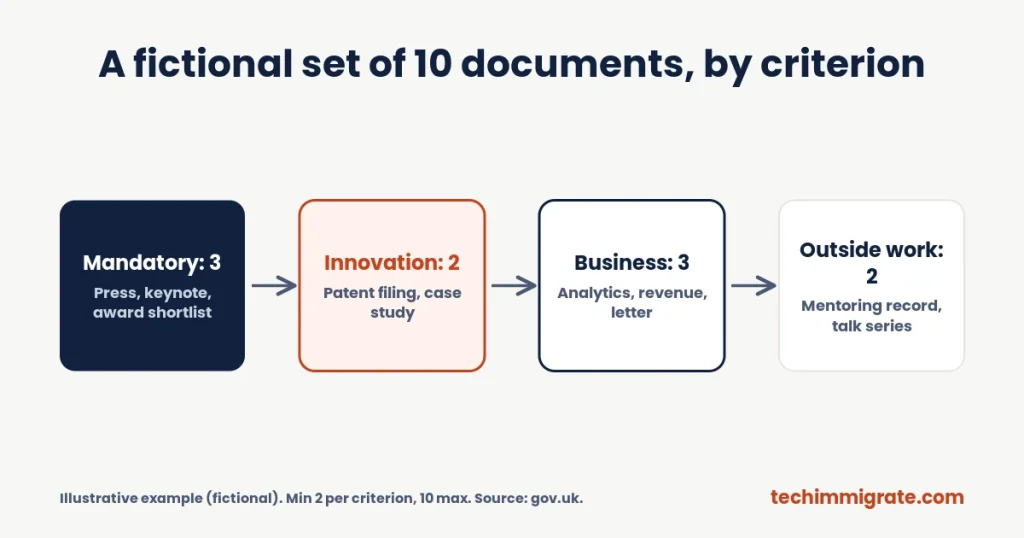
| Slot | Criterion | Document | Why it earns its place |
|---|---|---|---|
| 1 | Mandatory | Independent trade article about his product launch | Third-party, names his role |
| 2 | Mandatory | Invited keynote programme and recording | External event |
| 3 | Mandatory | Industry award shortlist from a trade body | Outside his employer |
| 4 | Innovation | Patent filing for a routing method | Shows a new technology |
| 5 | Innovation | Customer case study with usage figures | Shows adoption |
| 6 | Contribution | Product roadmap and analytics screenshot, explained | Shows his decisions and results |
| 7 | Contribution | Audited revenue summary for the product line | Verifiable commercial impact |
| 8 | Contribution | Employer letter confirming his scope and results | Adds context to the numbers |
| 9 | Recognition outside the day job | Mentoring programme record from an external body | Independent confirmation |
| 10 | Recognition outside the day job | Open talk series he started, with audience data | Shows reach beyond work |
Reading the table
This set gives the mandatory criterion 3 documents and the others 2 or 3. Every criterion clears the minimum of 2. No document is reused, and each fits within 3 A4 sides.
Marcus claims three optional criteria here, which is allowed. A tighter set would use only two and spend the spare slots on the strongest ones.
Formatting Rules for Global Talent Visa Evidence Documents
Format each document so a stranger can read it fast. The gov.uk guidance caps each piece at 3 A4 sides. Tech Nation's guidance also bars shrunk text and collages of many items squeezed onto one page.
When you prepare each file, follow these habits:
- Add a clear title that says what the document proves
- Keep a short note at the top: what it is, when, who confirms it
- Annotate screenshots so the key figure is easy to find
- Make links clickable, but do not rely on links alone as proof
- Keep dates inside the last five years
- Translate non-English documents where needed, and say so
How to explain a document without padding
Add a two-line caption above each item. Say what the item is, who produced it and which claim it supports. Then stop, because any extra text uses space that evidence could fill.
Where the CV and Letters Fit
The CV and the three letters sit outside the 10 documents, but they must match your evidence. The gov.uk guidance gives a CV limit of 3 A4 sides. Each recommendation letter can run to 3 single A4 sides, and the author must have known your work for at least 12 months.
Letters must be typed, dated and signed, and each should give different examples. They support your evidence but do not replace it. Our guide to recommendation letters shows how to brief your referees. Your personal statement should then tie the whole set together.
Illustrative Example (Fictional): A Two-Line Caption
A short caption helps a reader see why a document is there. Here is a fictional caption for one slot in Marcus's set.
Illustrative example (fictional): "Slide 1 of 2: Trade magazine feature on the launch of the routing platform, published in the last two years. The article names Marcus as product lead and gives the adoption figure he drove."
Why this works
The caption names the source, the date range, the role and the result. Because of that, the reader does not have to hunt for the point. It also leaves most of the 3 A4 sides for the proof itself.
Translations and links
If a document is not in English, include a translation so the reader can follow it. Where a document lives online, add the link as well as a printed copy. Links can break, so the printed copy protects you if the page changes.
How Long Does Choosing Your Evidence Take?
Most applicants need several weeks to choose well, because collecting and checking documents takes real time. The exact time depends on how much proof already exists.
A rough plan could look like this. It is only an illustration, and your own timing will vary.
- Week 1: build the inventory
- Week 2: score each item and map it to criteria
- Weeks 3 and 4: request missing documents from outside sources
- Week 5: choose, cut and write captions
- Week 6: final audit against the rules
Meanwhile, start your referee conversations early. Referees often need time to write a detailed letter, so the evidence work and the letter work can run side by side.
Common Mistakes When Choosing Global Talent Visa Evidence Documents
Most mistakes come from picking by habit or volume rather than by score. Applicants often report these patterns in forums, so treat them as applicant-reported, not official.
- Using an internal award as proof of recognition
- Reusing one document for two criteria
- Packing 6 articles onto one page to save slots
- Adding old evidence from outside the five-year window
- Relying on company claims with no outside source
- Leaving one criterion with only one strong document
Our list of Tech Nation endorsement mistakes covers more of these. If you run a final audit before you submit, you can catch most of them.
A last-day checklist
- Total documents: 10 or fewer
- Every document: 3 A4 sides or fewer
- Every claimed criterion: at least 2 documents
- No document used twice
- Everything within the last five years
Global Talent Visa Evidence Documents FAQ
You can submit up to 10 evidence documents, each up to 3 A4 sides. You need at least 2 for the mandatory criterion and 2 for each optional criterion you claim. Your CV and three recommendation letters sit outside the 10.
No. The gov.uk guidance says you cannot use the same piece of evidence for more than one criterion. If an item could fit two, choose the criterion that needs it more and find a separate document for the other.
No. The CV and the three recommendation letters do not count towards the 10 pieces of evidence. However, letters cannot replace evidence, so they should support the documents you choose and match them with consistent examples.
Links alone are risky because a reader must trust that they work and show what you claim. Screenshots help when you annotate them with context. Pair public links with a printed document that explains what the item proves.
Look for independent sources instead, such as press coverage, customer case studies or public usage data. An employer letter can confirm your role and scope. Applicants in this situation often use outside proof for the numbers and the letter for context.
Your Next Step
Start by running the inventory and scoring steps on your own folder. Want the guide for your role? See the guides.
Next, open the role guide closest to your work. Our role-specific endorsement guides include an evidence checklist and planner. Visit the guides hub, or go to the software developers guide, the product managers guide or the data and AI specialists guide.
How We Checked This Article
We read the gov.uk page on documents you need for the digital technology endorsement, which sets the 10-document limit, the 3 A4 sides, the 2-per-criterion minimum and the no-reuse rule. We also read the main Global Talent page and Tech Nation's what to consider guidance for the evidence quality warnings. The scoring method and the allocation table are our own illustrations, not official tools.
Tech Immigrate is independent of Tech Nation and the Home Office. This article is general information, not legal advice, and nobody can guarantee an endorsement. Always confirm current rules on gov.uk before you apply.
We write practical guides for tech professionals applying for the UK Global Talent visa. Tech Immigrate is independent of Tech Nation and the Home Office, and our articles are general information, not legal advice. Rules and fees change, so always check gov.uk before you apply.