How Software Developers Turn GitHub Into Global Talent Visa Evidence (7 Proof Types)
GitHub Global Talent Visa evidence for developers: 7 proof types Tech Nation can use, what weak GitHub evidence looks like and how to build each document.

In this article
- Why a GitHub link alone is not enough
- What GitHub Global Talent Visa evidence does Tech Nation accept?
- Do stars and commits count as GitHub Global Talent Visa evidence?
- Seven proof types for GitHub Global Talent Visa evidence
- Mapping your GitHub Global Talent Visa work to the criteria
- How to build your evidence step by step
- Third-party validation: why it matters most
- Screenshot rules for GitHub Global Talent Visa documents
- Illustrative example (fictional): one project, one document
- What if your best code is private?
- Common GitHub Global Talent Visa evidence mistakes
- Presentation checklist for each GitHub document
- GitHub Global Talent Visa FAQ
- Your Next Step
- How We Checked This Article
GitHub Global Talent Visa evidence works when you turn your open-source work into focused documents that show your role, your impact and outside recognition. A link to your profile or a count of stars or commits does not do that on its own.
This GitHub Global Talent Visa guide is for software developers who build in public or in private. You get seven proof types, a mapping to the criteria, screenshot rules, a fictional worked example and the mistakes that sink GitHub evidence.
Key takeaways
- A GitHub profile link is not evidence. Each document must support one criterion and fit in three sides of A4.
- Stars and commit counts show attention and effort. They do not show impact on their own.
- The seven strongest proof types combine your role with adoption, outside recognition or independent validation.
- Third-party validation matters most, because Tech Nation looks for recognition from outside your employer.
- Use full-size, readable screenshots with dates and URLs. Do not shrink them or pile them into a collage.
- For private code, use a redacted summary and a signed statement from a senior leader instead of a repository link.
Why a GitHub link alone is not enough
A GitHub link alone is not evidence because it does not say which criterion it supports, what you did or why it matters. The panel reads your documents, not your repositories, so you must do the explaining.
Gov.uk lets you submit a maximum of 10 evidence documents, each up to three sides of A4. It also says you cannot use the same piece of evidence for more than one criterion. You can read the rules on the gov.uk page about documents you need to apply.
Tech Nation's own guidance on what to consider warns against evidence that cannot be independently verified. It also warns about unsubstantiated claims. So a bare profile link, which proves nothing about your role or impact, is a weak use of one of your 10 slots.
Think of GitHub as the source, not the document. The document is what you build from it: a short, structured file that makes one point and backs it with checkable facts. Our guide to Global Talent Visa evidence documents covers the wider slot plan.
What GitHub Global Talent Visa evidence does Tech Nation accept?
Tech Nation can use GitHub evidence when it proves recognition, innovation or a significant contribution, and when someone other than you can check it. The platform itself does not matter. What the work shows does.
There is no official list of accepted GitHub evidence. Gov.uk and Tech Nation describe criteria, not file types, so any advice on "what counts" is interpretation. Treat the rest of this guide as a way to match your work to the criteria, not as a guarantee.
In practice, applicants in this situation often find that these things carry weight:
- A clear role, such as creator, maintainer or core contributor.
- Adoption by other people, shown by dated, checkable figures.
- Independent mentions in articles, talks, papers or documentation.
- Statements from people who use or maintain the project.
- Work from the last five years, because the criteria look at that window.
The mandatory criterion asks for recognition as a leading or potential talent. Gov.uk's See the guides lists the optional criteria too, including contributions to the sector outside your immediate occupation. Open-source work most often fits that one.
Do stars and commits count as GitHub Global Talent Visa evidence?
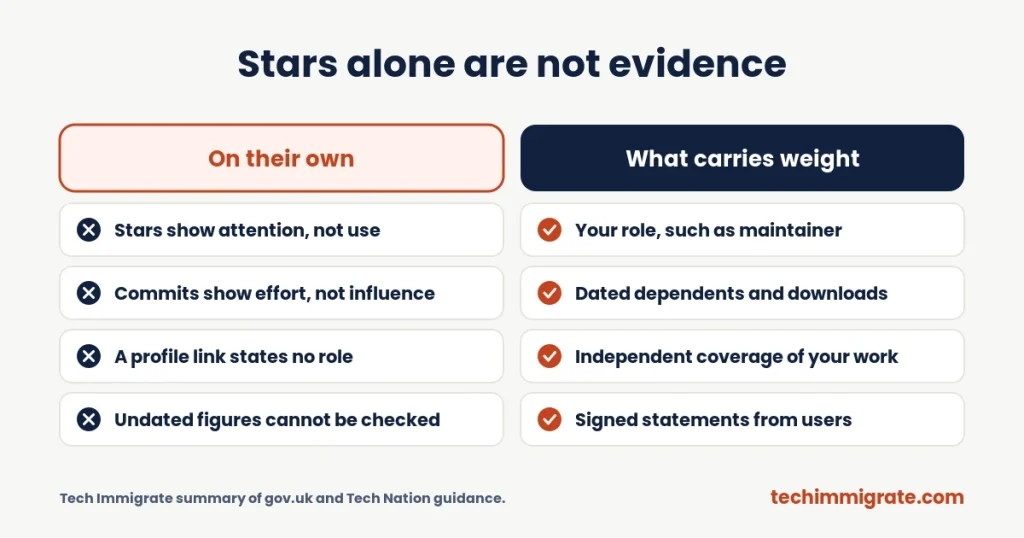
Stars and commits can support a case, but neither proves impact alone. A star shows that someone bookmarked your work. A commit shows that you changed something. Neither shows who relies on it or why it matters.
Applicants report that panels look for more than counts. That is applicant-reported, not official guidance, but it matches how the criteria read. They ask for recognition and contribution, and a number alone does not show either.
The problems with stars
Stars are easy to misread, for a simple reason. They measure attention, they can come from one viral post, and they do not tell the reader how the project is used. As a result, a repository with 8,000 stars and no users may prove less than one with 300 stars and 40 companies depending on it.
If you quote stars, add context. Say what the project does, who uses it and how the numbers grew. Always date each figure, because numbers change quickly.
The problems with commits
A busy contribution graph shows effort, not influence. However, effort is not the test. Commit counts also vary by habit: one developer makes ten small commits where another makes one large one. So "1,200 commits" tells the panel very little.
Instead, pick the two or three changes that mattered most. Explain what each one did, such as a new feature, a speed gain or a security fix, and link to the merged pull request.
Seven proof types for GitHub Global Talent Visa evidence
The seven proof types below each pair something you did with something others can check. You will not need all seven. Most strong documents use two or three of them together.
| # | Proof type | What it shows | Likely criterion |
|---|---|---|---|
| 1 | Maintainer or creator role | You own or lead a project | Outside-work contribution, innovation |
| 2 | Public dependents and downloads | Other people rely on your work | Outside-work contribution, mandatory |
| 3 | Notable users | Respected organisations use it | Mandatory, outside-work contribution |
| 4 | Significant merged contributions | You improved other people's projects | Outside-work contribution |
| 5 | Independent coverage | Others wrote or spoke about your work | Mandatory criterion |
| 6 | Peer and user statements | Experts confirm your role and impact | Supports any criterion |
| 7 | Community and ecosystem work | You help others build and secure software | Outside-work contribution |
The "likely criterion" column is our reading of the criteria, not an official mapping. Always choose the one criterion each document supports before you build it.
1. Maintainer or creator role
A maintainer role proves ownership, which is stronger than a contributor role. Show it with the repository's governance page, a maintainers file, the organisation's member list or release notes that carry your name.
Then add what you actually led: releases, roadmaps, reviews or major rewrites. If you started the project, say when, and what problem prompted it.
2. Public dependents and downloads
Dependents and downloads show that other people build on your work. GitHub's dependency graph lists repositories that depend on yours, and package registries show download counts.
GitHub's documentation says it only determines dependents for public repositories, and that counts are approximate. So state the figure, the date and where the reader can check it. Say "about 1,200 public dependents on the date shown" and not "1,200 dependents".
3. Notable users
Notable users show that respected organisations trust your work. Link to a public page where they say so, such as a case study, a blog post, a conference talk or a file in their own repository.
Also, never name a company that has not said it publicly uses your work. If you know a team uses it privately, ask for a short signed statement instead.
4. Significant merged contributions
Merged pull requests to well-known projects show that maintainers trusted your work. They matter most when they fix a hard bug, add a feature that users asked for or improve speed or security.
Instead, think quality over quantity. Two or three significant changes, each explained in a line or two, beat a list of forty small fixes. Link to each pull request and say why it mattered.
5. Independent coverage
Independent coverage is the proof type that most developers forget. It means articles, newsletters, talks, papers, course material or documentation written by other people about your work.
Because it comes from outside your employer, it speaks directly to recognition. So save the page, keep the URL visible and note the date. A single mention in a respected outlet can carry more weight than a thousand stars.
6. Peer and user statements
A short signed statement from a co-maintainer, a user or a team lead can confirm what the numbers cannot. It should say how they know your work, what you did and what changed because of it.
These statements are different from your three recommendation letters. Letters have set rules, which we cover in our guide to Global Talent Visa recommendation letters. Tech Nation's guidance rules out templated and AI-written documents, so each person must write in their own words.
7. Community and ecosystem work
Community work shows leadership beyond your own code. Examples include answering questions for hundreds of users, running a contributor programme, mentoring newcomers, fixing security issues or writing guides that others cite.
If you can, show it with dated links, a short count of what you did and one or two confirmations from the people you helped.
Mapping your GitHub Global Talent Visa work to the criteria
Open-source work maps most often to the outside-work criterion, and sometimes to the mandatory, innovation or academic criteria. Each document supports only one criterion, so plan the mapping first.
The criteria in short: the mandatory criterion asks for recognition as a leading or potential talent. You then need two of four optional criteria. These cover innovation, recognition outside your day job, a significant contribution to a product-led business and academic contributions. Our criteria guide explains each one.
| Your GitHub work | Document idea | Possible criterion |
|---|---|---|
| A library others rely on | Role, adoption, notable users | Outside your day job |
| A new tool or method | What is new, who adopted it, independent coverage | Innovation |
| Research code with citations | Paper, repository, citations by others | Academic contributions |
| Code from your employer's product | Redacted summary, impact, leader's statement | Contribution to a product-led business |
| Talks, guides or mentoring | Dated links and audience figures | Outside your day job |
Employer work needs care, however. Tech Nation's rules say recognition evidence should come from outside your employer, and internal awards do not count. So use private product work for the contribution criterion, and use public work for recognition.
How to build your evidence step by step
Build each document from one decision outward: pick the criterion first, then the proof, then the layout. This order stops you from piling up facts that support nothing.
- List your public projects from the last five years, with your role in each.
- Pick the two or three that others rely on or have written about.
- Choose the one criterion each document will support.
- Collect dated figures, links and independent mentions for each.
- Ask one or two people for short signed statements.
- Draft a cover note, then the contribution page, then the impact page.
- Check the PDF, count the pages and test every link.
Because Tech Nation does not review documents before you submit, a friend or mentor who has read the criteria can act as a first reader. Ask them one question: "What does this document prove?" If the answer is unclear, rewrite the cover note.
Third-party validation: why it matters most
Third-party validation matters most in any GitHub Global Talent Visa case because it shows other people recognise your work, which is what the mandatory criterion asks for. Your own README and your own numbers are claims. Outside voices are proof.
Good third-party sources include:
- Articles or newsletters about your project.
- Talks or workshops that feature your work.
- Papers or documentation that cite or build on your code.
- Statements from maintainers of other projects.
- Invitations to speak, review or join a project team.
Each one should be public, dated and tied back to you, because the panel cannot ask you questions. If the source mentions the project but not your name, add a line saying what your role was, and link to proof, such as the commit history.
Also note that LinkedIn and Medium posts on their own do not count, according to Tech Nation's guidance. A post that you wrote about your own project is a claim. A post by someone else about your project is better.
Screenshot rules for GitHub Global Talent Visa documents
Screenshots can support your document, but they must be full size, readable and clear about where they came from. Tech Nation's guidance rejects shrunk or collage evidence, so never squeeze many images onto one page.
Follow these practical rules:
- Use one clear screenshot per point, at a size where the text can be read without zooming.
- Show the full URL and the date where you can, so the reader can check it.
- Highlight the one line that matters, such as your name in a contributors list.
- Add a caption that says what the image proves.
- Do not shrink several screenshots to fit one page.
- Do not build a collage of badges, graphs and dashboards.
- Never alter what an original image shows.
Redacting private details such as client names or personal data is fine. However, changing content is not, because it would make the evidence unreliable. Save each screenshot as a high-resolution image. Then place it in your document and check the final PDF at normal zoom, since small text often blurs on export.
Illustrative example (fictional): one project, one document
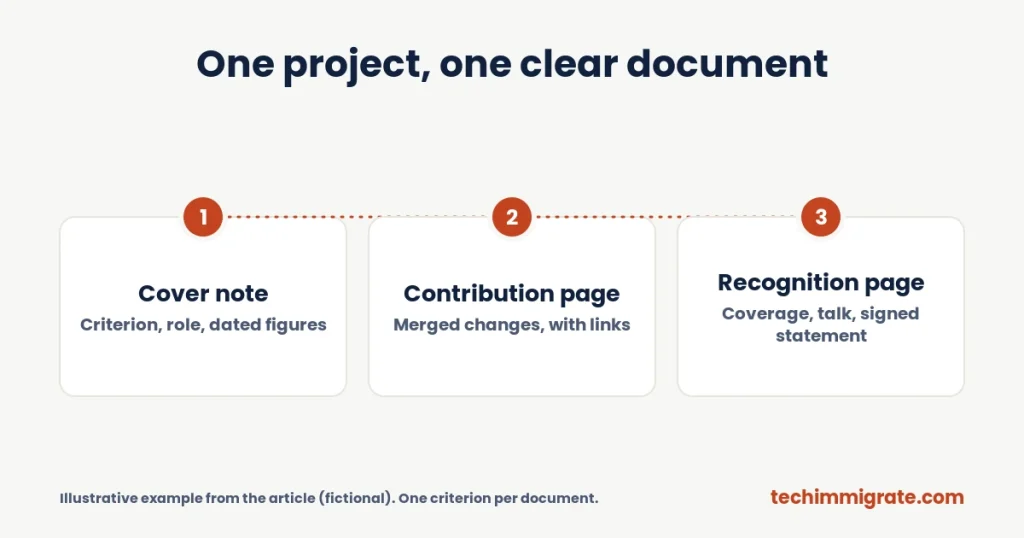
Illustrative example (fictional): Priya is a developer at a logistics software company. In her own time she created a small open-source library that validates delivery schedules. She wants one document for the outside-work criterion.
First, page one is a cover note. It names the criterion, says what the library does and gives a short table: role (creator and lead maintainer), years active, number of releases she led, and public dependents and weekly downloads, each with a date and a link.
Next, page two covers her contribution. It lists three merged changes: a rewrite that made validation about four times faster, a fix for a time-zone bug that affected users and a new plug-in system. Each has a link and one line on why it mattered.
Finally, page three covers recognition. It cites a newsletter feature by an independent editor, a conference talk by another maintainer that used her library and a short signed statement from the lead engineer of a delivery company that depends on it.
The GitHub Global Talent Visa document makes one point, uses checkable sources and keeps her employer out of the recognition claim. Her second document, on a different criterion, uses different evidence, so no document is used twice.
What if your best code is private?
If your best code is private, you can still build a strong document without sharing it. Use a redacted summary and a signed statement from a senior person who can confirm the facts.
Here is a practical approach:
- Replace the repository link with a redacted architecture diagram.
- Describe what you owned, what you built and what changed.
- Share scale and impact in plain terms where you are allowed to, such as users, transactions or speed gains.
- Ask a senior leader to confirm the figures you cannot publish.
- Keep your name, the company, the dates and the outcome visible.
Never share material that breaks your contract or an NDA. Ask permission first, since redacted private work can still make strong evidence. Remember that private work usually fits the contribution criterion better than the recognition criteria, because the evidence comes from inside your employer.
Common GitHub Global Talent Visa evidence mistakes
The most common mistakes are weak proof, missing dates and unclear roles. Each is easy to fix when you build documents on purpose.
- A profile link as the document. Build a structured file instead.
- Stars or commits as the only metric. Add adoption, users and outside coverage.
- Undated figures. Date every number and say where to check it.
- Unclear role. Say if you created, maintain or contribute, with proof.
- A project built for the application. Applicants report that panels doubt projects that look new and unused, so show real history and real users.
- Old evidence. Keep to the last five years where the criteria require it.
- One document for two criteria. Gov.uk does not allow it.
- AI-written text. Tech Nation's guidance rules it out, so write your own.
For the wider list, see our guide to Tech Nation endorsement mistakes. Applicant communities such as the Tech Nation Visa Forum report these patterns, but they are applicant-reported, not official data.
Presentation checklist for each GitHub document
Check each document against this list before you export your final PDF.
- Does the cover note name the criterion and what the document proves?
- Is your role clear in one line?
- Are all figures dated and linked to a source?
- Is there outside validation, not just your own claims?
- Are screenshots full size, readable and uncluttered?
- Is it within three sides of A4 when you check the PDF itself?
- Do all links open and point to the right page?
- Does the file name say what it is, such as 03_OC2_Library-maintainer.pdf?
If any answer is no, fix it before you upload. The panel decides overall, so a clear, honest document usually reads better than a crowded one.
GitHub Global Talent Visa FAQ
Yes, as a source. Build focused documents of up to three A4 sides from your repositories, each supporting one criterion. A profile link alone is weak, because it does not show your role, your impact or who recognises your work.
There is no official threshold. Stars show attention, not impact. Tech Nation looks for recognition and contribution, so pair any star count with dated figures on dependents, downloads, notable users and independent mentions of your work.
Often, yes. Open-source work most often fits the criterion on contributions to the sector outside your day job. Focus on significant merged changes, maintainer roles and proof that other people rely on your work, not on a commit count.
You can use them as supporting detail, but keep them full size, readable and labelled. Tech Nation's guidance rejects shrunk or collage evidence, so use one clear screenshot per point, with the URL and date visible.
Use a redacted architecture summary, explain scale and impact in plain terms, and ask a senior leader for a signed statement confirming figures you cannot publish. Never share material that breaks your employment contract or an NDA.
Your Next Step
Developers who plan their GitHub Global Talent Visa documents early tend to submit clearer evidence. Our role-specific endorsement guides include an evidence checklist and planner, so you can map each repository to a criterion before you write a word. Start with the software developers guide, or browse the guides hub.
If your work sits closer to data, security or product, see the data and AI specialists guide, the cybersecurity specialists guide or the product managers guide. Want the guide for your role? See the guides.
How We Checked This Article
We checked the evidence rules against the gov.uk page on documents you need to apply for endorsement: the 10-document limit, the three-side limit and the rule against reusing evidence. We read the gov.uk eligibility page for the criteria wording. Tech Nation's guidance on what to consider also helped, since it warns against vague, outdated and unverifiable evidence. GitHub's documentation on dependents covered the dependents figures.
Several applicant write-ups helped us find how developers present open-source work. They are personal accounts, not official guidance, and the advice on stars, commits and projects built for the application is applicant-reported. The people, projects and figures in the example are fictional.
Tech Immigrate is independent of Tech Nation and the Home Office. This article is general information, not legal advice, and nobody can guarantee an endorsement. Always confirm current rules on gov.uk before you apply.
We write practical guides for tech professionals applying for the UK Global Talent visa. Tech Immigrate is independent of Tech Nation and the Home Office, and our articles are general information, not legal advice. Rules and fees change, so always check gov.uk before you apply.