Global Talent Endorsement Review Form: How to Fill It In (and What to Write)
How to fill in the Global Talent endorsement review form: each part explained, what to write in the grounds boxes, the 28-day deadline and common mistakes.


In this article
- What Is the Global Talent Endorsement Review Form?
- Should You Use the Review Form at All?
- Where Do You Download the Form?
- How Do You Fill In Part 1: About You?
- How Do You Fill In Part 2: Grounds for Review?
- How Do You Fill In Part 3: Declaration?
- How Do You Send the Form (Part 4)?
- What Happens After You Send It?
- What Mistakes Make Reviews Fail?
- A Fictional Example: One Good Ground and One Weak One
- Do You Need Help to Fill In the Form?
- How Is a Review Different From a Complaint or Judicial Review?
- Review or Reapply? A Quick Decision Check
- Get the Guide Written for Your Role
- Frequently Asked Questions
- How We Checked This Article
The Global Talent endorsement review form is the official GOV.UK form you use to ask for a review after your endorsement is refused. You download it from GOV.UK, fill in your details and, for each refusal reason you dispute, copy the reason exactly from your decision letter and explain briefly how you met it using evidence you already submitted. You then sign it by typing your name and email it to the Home Office within 28 calendar days of the refusal email. It is free, you get one review per refusal, and you cannot add new evidence.
This guide is for anyone refused Global Talent endorsement, especially by Tech Nation, who has decided a review may be worth trying and wants to fill in the form properly. It walks through each part of the current form (version 09/2025), explains what to write in the grounds boxes, and covers the mistakes that make reviews fail. It describes the official form and guidance in our own words; always use the latest version from GOV.UK.
Key takeaways
- The form is called the Global Talent endorsement review form. The current version (09/2025) is for applications made on or after 1 September 2025.
- Email it to GlobalTalentEndorsements@homeoffice.gov.uk within 28 calendar days of the date of your refusal email.
- In Part 2, copy each refusal reason exactly into box (a), then briefly explain in box (b) how you met it and which evidence you already sent.
- You cannot include new evidence. New documents mean a new Stage 1 application and a new fee.
- The Home Office aims to reply within 28 calendar days. A review does not extend your UK permission.
- Reviews rarely succeed. Use one only when the decision missed or misread evidence you actually submitted.
What Is the Global Talent Endorsement Review Form?
The endorsement review form is the only way to challenge a Stage 1 endorsement refusal for the Global Talent visa. GOV.UK publishes it as the "Global talent and Tier 1 (Exceptional talent): endorsement review form", and describes it as the form to use if your endorsement application is refused and you want to appeal against that decision. Strictly, it is a review, not an appeal: there is no right of appeal to a tribunal for an endorsement refusal.
The form was last updated on 10 September 2025. The current version, 09/2025, says it is only for applications made on or after 1 September 2025, so if you applied earlier, check GOV.UK for the version that applies to you.
The review itself is governed by the Home Office's endorsement review guidance. In summary, according to GOV.UK:
| Rule | What GOV.UK says |
|---|---|
| Cost | Free |
| Deadline | 28 calendar days from the date of the refusal email |
| Number of reviews | One per refusal decision |
| New evidence | Not allowed; new evidence needs a new application and fee |
| Who decides | The endorsing body that refused you (for digital technology, Tech Nation), via the Home Office |
| Decision time | Aim of 28 calendar days from receiving the form |
| Your UK permission | Not extended while the review is considered |
If you are not sure whether a review is the right route at all, read how to challenge a Global Talent visa refusal first. It compares a review with reapplying.
Should You Use the Review Form at All?
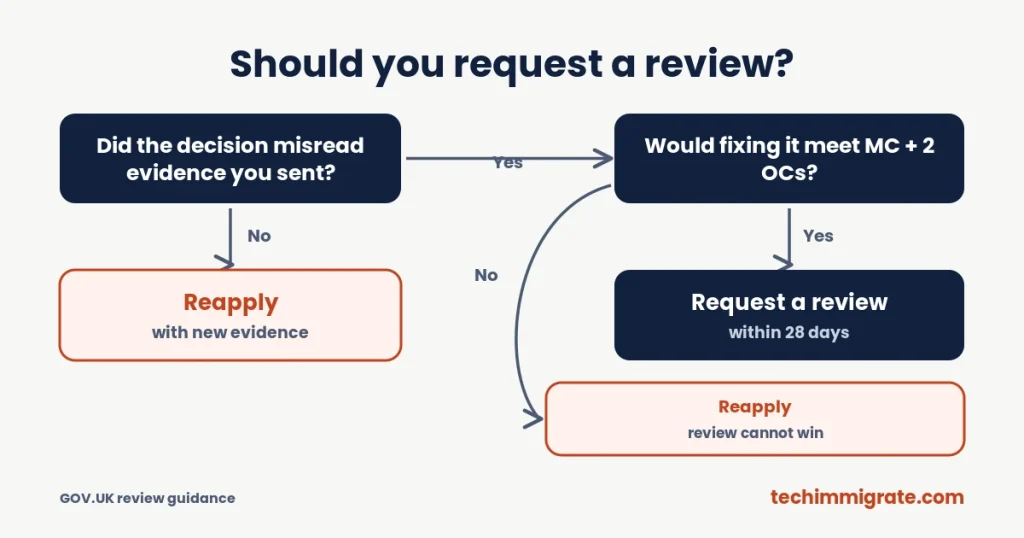
Before you spend time on the form, check that a review can actually help. The form says you can ask for a review if there was an error in processing your application, or if the endorsing body did not apply its criteria correctly. The guidance gives examples such as a piece of evidence you supplied not being considered.
A 2020 Home Office code of practice for endorsing bodies says challenges can only be made on grounds of process, and that challenges to the substance of an expert judgement are not accepted. In plain English: the reviewer will not re-weigh your evidence just because you disagree with the assessor's opinion.
| A review can work when… | Reapplying is usually better when… |
|---|---|
| The decision says evidence was missing, but it is in your application | The decision says your evidence was not strong enough |
| A date, title, figure or company was misread | Your letters came from colleagues or described your job |
| You were assessed against the wrong route (for example Talent instead of Promise) | You chose criteria your evidence could not prove |
| The decision ignored a criterion you claimed, or one you did not claim was assessed | The evidence showed team results, not yours |
Home Office figures released under a Freedom of Information request (FOI2026/10735) and published by Edgewater Legal suggest only about 4 in 100 decided Tech Nation reviews succeeded. Those figures have not been independently verified, but they match what applicants report. Our Global Talent visa endorsement review article covers the decision in more depth.
Where Do You Download the Form?
The form is on GOV.UK under "Global talent and Tier 1 (Exceptional talent): endorsement review form". It is a fillable PDF. Download the latest version each time rather than reusing an old copy: the form changes, and the 09/2025 version applies only to applications made on or after 1 September 2025.
Before you start, gather:
- your refusal email, including the subject line;
- your decision letter (the refusal feedback, often called the proforma);
- the exact files you submitted, so you can refer to them by name, page and paragraph;
- your personal details as shown on your passport.
Our guide to the Global Talent visa rejection proforma explains how to read the decision letter before you write anything.
How Do You Fill In Part 1: About You?
Part 1 is straightforward, but mistakes here can delay your review.
| Question | What to enter | Watch out for |
|---|---|---|
| 1.1 Unique Reference Number (URN) | Your URN, which starts with "URN20" | It is in the subject line of your decision email |
| 1.2 Contact email address | An address you check daily | The Home Office replies by email |
| 1.3 Correspondence contact | Only if someone else should receive replies | Leave blank if it is you |
| 1.4 Contact address | Your full address and postcode | Include country |
| 1.5 Given name | As on your passport | Match your application exactly |
| 1.6 Family name | As on your passport | Same |
| 1.7 Other names | Any other names you use or have used | Include previous names |
The URN is the item people most often get wrong. Copy it from the decision email rather than typing it from memory.
How Do You Fill In Part 2: Grounds for Review?
Part 2 is where reviews are won or lost. The form gives four sets of boxes, numbered 2.1 to 2.4. Each set has two parts.
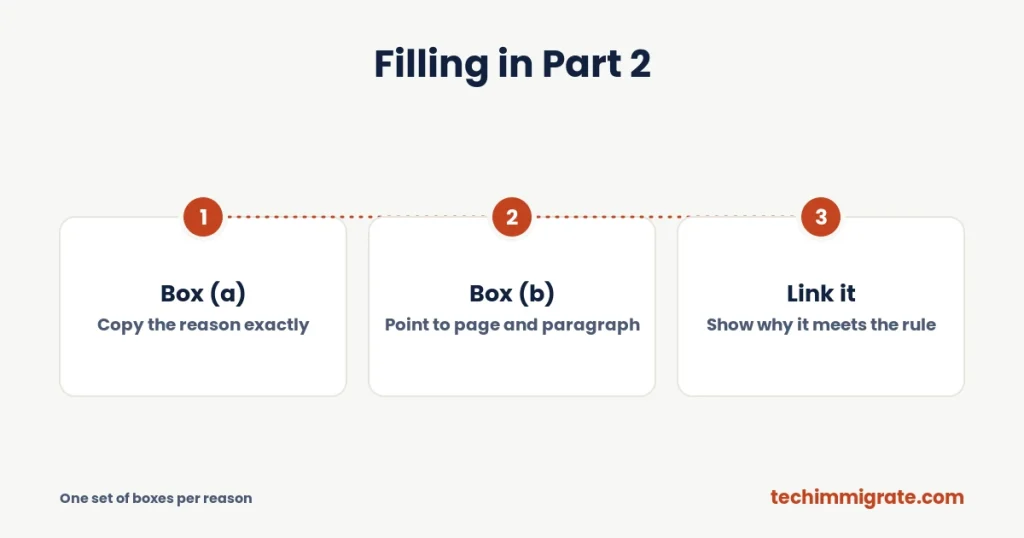
- Box (a): enter the reason for non-endorsement exactly as shown in your decision letter.
- Box (b): briefly explain how you meet the requirement and what evidence you submitted with your original application.
The form's own instructions add a few rules:
- use a new set of boxes for each error you are alleging;
- do not repeat the same reason in two sets of boxes;
- keep explanations brief and concise, summarising the error and the supporting evidence;
- if you refer to the Immigration Rules, give the paragraph number and sub-section, but do not copy the rule text.
The form gives no word limit; the space in each box is the only constraint.
What should box (a) contain?
Copy the refusal reason word for word. Do not paraphrase, summarise or soften it. The reviewer needs to see exactly which part of the decision you are challenging, and an accurate quotation shows you are engaging with the decision rather than arguing with it.
If a single paragraph of your decision covers several points, choose the specific sentence that contains the error.
What should box (b) contain?
Box (b) should do three things, in this order:
- State the error in one sentence. For example, that the decision says no external recognition was provided, but it was.
- Point to the exact evidence. Name the document as you submitted it, with page and paragraph, so the reviewer can find it in seconds.
- Say why it meets the requirement. One or two sentences linking the evidence to the criterion as written in the guidance.
What box (b) should not contain: new evidence, new explanations that were not in your application, complaints about the assessor, or long arguments about why you are talented. The Tech Nation guide makes the same point: keep arguments concise, focus on processing mistakes, and do not submit complex or excessive information.
Tip: If you cannot point to a page and paragraph in your original application for a point you want to make, that point does not belong in a review. It belongs in a new application.
How many grounds should you include?
Include every refusal reason where there is a genuine error, and only those. If your refusal has three reasons and only one involves a clear mistake, a review that challenges all three can dilute the one good point.
Remember the arithmetic of the criteria: you need the mandatory criterion plus two optional criteria. If you were refused on two criteria and only one has a genuine error, winning that point still leaves you short. In that case, a new application is usually the better use of your time.
How Do You Fill In Part 3: Declaration?
Type your name in the signature box; the form treats this as an electronic signature. Add the date. By signing, you confirm that the information in your review request is accurate.
If someone helped you prepare the form, you are still the person confirming it is accurate, so read every word before you sign. The information may be shared with other government departments for immigration purposes.
How Do You Send the Form (Part 4)?
The form ends with a short "what to do next" section:
- Keep a copy of the completed form.
- Press the "submit form" button, which should open an email with the form attached, addressed to the Global Talent review team.
- If the button does not work, save the form, attach it to a new email and send it to GlobalTalentEndorsements@homeoffice.gov.uk.
- If your contact details change while you wait, tell the same address.
Send it well before day 28. The deadline runs from the date of the refusal email, not the date you read it. Late requests are only accepted in exceptional circumstances, according to GOV.UK.
Do not attach your evidence again unless the guidance tells you to. The reviewer looks at your original application, and any new evidence is returned with the outcome.
What Happens After You Send It?
The Home Office forwards your request to the endorsing body that made the decision. For digital technology, that is Tech Nation. The Home Office aims to reply within 28 calendar days; if it cannot, it will email you with an expected date.
There are three possible outcomes, according to GOV.UK's guidance:
| Outcome | What it means | What you can do next |
|---|---|---|
| Upheld for the same reasons | The refusal stands | No further review; reapply or choose another route |
| Upheld for revised reasons | A new refusal letter with fresh reasons | A further review limited to any new reasons |
| Overturned | You are endorsed | Apply for the visa (Stage 2) |
If you are in the UK, remember that a review does not extend your permission. If your visa expires during the review, you will be treated as overstaying, so plan your immigration status separately.
Applicants often report that the review reply contains more detailed reasons than the original decision, which can help a reapplication even when the refusal stands (applicant-reported).
What Mistakes Make Reviews Fail?
These are the mistakes we see most often in reviews applicants share:
- Arguing with the judgement, not showing an error. "The assessor was wrong to say my talks were low-profile" is a disagreement. "The decision says I gave no talks; Document 6, page 2 lists three invited talks with attendance figures" is an error.
- Adding new evidence. It is not allowed and is returned. Some applicants try to slip it in as "clarification".
- Paraphrasing the refusal reason. Box (a) should be an exact copy.
- Writing too much. Long submissions are harder to assess and the Tech Nation guide warns against excessive material.
- Challenging reasons that do not change the outcome. Winning one criterion is pointless if you would still fall short of the mandatory plus two optional criteria.
- Missing the deadline. 28 calendar days from the refusal email.
- Wrong URN or details, which can delay the review.
- Using an old form version. The 09/2025 form applies to applications made on or after 1 September 2025.
A Fictional Example: One Good Ground and One Weak One
Kofi (a fictional applicant) was refused on the mandatory criterion and OC3.
| Ground | His first draft | Assessment |
|---|---|---|
| Mandatory criterion: "no evidence of external recognition was provided" | Points to Document 3, page 1: an award from a national technology body, with the judging criteria | A genuine error: the evidence was in the application. Keep it. |
| OC3: "the evidence shows team outcomes rather than the applicant's individual contribution" | Explains in new detail what he personally built, information not in his documents | Not an error: it is new information and disagrees with a judgement. Drop it. |
Even if Kofi wins the first ground, he still needs two optional criteria. If OC3 was the only other one he claimed, the review would leave him short. That is the kind of check to do before you send the form.
Do You Need Help to Fill In the Form?
You do not need an adviser to request a review; the form is designed for applicants to complete themselves. But the review is your one chance to challenge that decision, so it is worth being careful.
If your case is complex, for example if you are in the UK and your permission is running out, or you think the refusal reflects a wider problem with how your application was handled, speak to an adviser registered with the Immigration Advice Authority or a solicitor. A forum member or friend can give a useful second opinion, but they are not regulated and only see what you show them.
How Is a Review Different From a Complaint or Judicial Review?
Three routes are easy to confuse after a refusal, and choosing the wrong one wastes time.
| Route | What it covers | Cost and deadline |
|---|---|---|
| Endorsement review | Errors in how your endorsement application was processed or assessed against the criteria | Free; 28 calendar days from the refusal email |
| Home Office complaint | Poor service, such as delays or rudeness, not the decision itself | Free; through the Home Office complaints procedure |
| Judicial review | Whether the decision was unlawful, for example irrational or procedurally unfair | Court fees and legal costs; strict time limits; a last resort |
GOV.UK's guidance says matters outside the scope of an endorsement review are handled through the normal Home Office complaints procedure, and you will be told so in writing. A complaint will not change your endorsement decision.
Judicial review is rare for Global Talent cases and carries real cost risk. It is something to discuss with a solicitor, usually only after an endorsement review has been refused and you believe the decision was legally flawed. For most applicants, the realistic choice is between a review and a new application.
One more distinction matters: everything in this guide is about Stage 1. If you were endorsed but the Home Office then refused the visa at Stage 2, the endorsement review form does not apply; that refusal letter will explain your options, which are usually administrative review.
Review or Reapply? A Quick Decision Check
Ask yourself three questions before you complete Part 2:
- Can I point to a page in my original application that the decision got wrong? If not, a review is unlikely to work.
- If I win every point I can genuinely make, do I then meet the mandatory criterion plus two optional criteria? If not, the review cannot get you endorsed.
- Is the problem the strength of my evidence rather than how it was read? If yes, a stronger new application is the better route.
If you are reapplying, our article on why recommendation letters get Global Talent applications refused covers one of the most common fixes.
Get the Guide Written for Your Role
Our endorsement guides include the refusal patterns for your role, the review method with a worked example, and how to rebuild your evidence if a new application is the better route. Each guide also has the 3-page evidence template, a 12-week planner and a pre-submission checklist, at £79 until 30 November, then £125. Choose the guide for your role.
Frequently Asked Questions
It is on GOV.UK, listed as the "Global talent and Tier 1 (Exceptional talent): endorsement review form". The current version is 09/2025, for applications made on or after 1 September 2025.
The form must be emailed within 28 calendar days of the date of the email refusing your endorsement. Late requests are only accepted in exceptional circumstances.
Email it to GlobalTalentEndorsements@homeoffice.gov.uk. The form has a submit button that opens an email; if it does not work, attach the saved form to an email yourself.
No. GOV.UK says you cannot submit new information or documents in a review. Any new evidence is returned, and if you think new evidence would succeed, you should make a new Stage 1 application with the fee.
The form does not state a word limit; the space in each box is the limit. It asks you to keep explanations brief and concise, with a separate set of boxes for each reason.
The Home Office aims to respond within 28 calendar days of receiving the form. If it cannot, it will email you with an expected date.
Not legally. There is no right of appeal against an endorsement refusal. The review is a free, non-statutory process that checks whether a mistake was made, although GOV.UK and many applicants describe it informally as an appeal.
How We Checked This Article
We read the current Global Talent endorsement review form (version 09/2025, page last updated 10 September 2025) and GOV.UK's endorsement review guidance on 22 November 2026, along with the Home Office's Global Talent code of practice for endorsing bodies (February 2020) and Tech Nation's application guide (last updated 27 February 2026). Review success figures come from Home Office FOI figures (FOI2026/10735) published by Edgewater Legal in October 2026, which have not been independently verified.
Applicant experiences come from the Tech Nation Visa Forum, including a December 2025 review discussion and a 2025 review outcome. Forum material is applicant-reported, not official guidance. The named example is fictional.
Tech Immigrate is independent of Tech Nation and the Home Office. This article is general information about the official form, not legal advice. For advice on your own case, speak to an adviser registered with the Immigration Advice Authority or a solicitor.
We write practical guides for tech professionals applying for the UK Global Talent visa. Tech Immigrate is independent of Tech Nation and the Home Office, and our articles are general information, not legal advice. Rules and fees change, so always check gov.uk before you apply.