Register of Licensed Sponsors: How to Find UK Tech Companies That Sponsor
How to use the UK register of licensed sponsors to find tech companies that sponsor Skilled Worker visas: download, filter, ratings, routes and scams.


In this article
- What the Register Is
- How to Access It
- Understanding the Columns
- Ratings: A vs B
- Routes: What to Look For
- How to Search for Tech Companies
- What Being on the Register Does and Does Not Mean
- How to Approach a Sponsoring Employer
- What Sponsorship Costs the Employer
- Spotting Fake Sponsors and Scams
- Building a Target List: A Worked Example
- Spreadsheet Tips for the CSV
- Industries Within Tech That Sponsor Often
- If Your Preferred Employer Is Not a Sponsor
- Questions to Ask in an Interview
- Sponsorship vs Global Talent
- Keeping an Eye on Your Sponsor After You Start
- Other Registers You May Come Across
- How Long Sponsorship Takes Once You Have an Offer
- Common Mistakes
- Use the Register as a Starting Point
- How We Checked This Article
If you need a Skilled Worker visa, the most important question is not whether a company is hiring. It is whether that company can sponsor you. Only organisations holding a sponsor licence from the Home Office can issue a certificate of sponsorship, and the official list of those organisations is the register of licensed sponsors.
The register is free, public and updated on most working days, but it is not easy to use. It is a large spreadsheet listing tens of thousands of organisations across every sector, with legal names that often differ from the brand names you know. This guide explains what the register is, how to download and search it, how to read the ratings and routes, how to find tech companies on it, and how to use it alongside job boards and networking to find a real sponsored job.
Key takeaways
- The register of licensed sponsors is published by UK Visas and Immigration on GOV.UK, as a CSV file that can also be viewed in a browser.
- It lists every organisation licensed to sponsor workers, with the routes they can sponsor and their rating.
- For a Skilled Worker visa, look for organisations licensed for the Skilled Worker route with an A rating.
- Organisations are listed under their legal name, which may differ from their brand or trading name.
- Being on the register does not mean a company is hiring or will sponsor you. It means it can.
- The register does not show industry or company size, so combine it with Companies House, LinkedIn and job boards.
- Never pay anyone for a certificate of sponsorship. Genuine sponsors pay the fees themselves.
What the Register Is
The register of licensed sponsors is the Home Office's official list of organisations that can sponsor people on work routes. GOV.UK describes it as a list of organisations licensed to sponsor workers on the Worker and Temporary Worker routes, showing each sponsor's licensed category and rating.
The register was first published in 2013, and GOV.UK's update history shows it changing on most working days, as new licences are granted, ratings change, and licences are suspended or revoked. The file is large, over 10 MB, because it covers every sector of the economy.
For tech workers, the register answers one simple question: can this employer legally sponsor me for a Skilled Worker visa?
How to Access It
- Go to the register of licensed sponsors: workers page on GOV.UK.
- Choose either to view the file online in your browser, or to download the CSV.
- Open the CSV in a spreadsheet program, such as Excel, Google Sheets or LibreOffice.
Viewing online is fine for checking a single company. Downloading the CSV is better if you want to filter, sort and build your own list of target employers.
Understanding the Columns
The register usually includes these fields:
| Column | What it shows |
|---|---|
| Organisation name | The sponsor's legal name, as registered |
| Town or city | Where the sponsor is based |
| County | The county, if given |
| Type and rating | Whether the licence is for workers or temporary workers, and the rating, such as A or B |
| Route | The specific route the sponsor can use, such as Skilled Worker or Global Business Mobility |
A single organisation may appear on several rows, one for each route it is licensed for.
Ratings: A vs B
Sponsors are given a rating:
- A rating. The sponsor is fully licensed and can assign certificates of sponsorship.
- B rating. The sponsor has been downgraded, usually because of compliance concerns, and is on an action plan to improve. A B-rated sponsor usually cannot assign new certificates until it is upgraded back to A, although it can continue to sponsor existing workers.
If a company you are talking to is B-rated, ask about it. It may still be a good employer, but it may not be able to sponsor you until the issues are resolved.
If a company's licence is suspended or revoked, it is removed from the register or shown as suspended. Workers sponsored by a company whose licence is revoked usually have their visas shortened and need to find a new sponsor.
Routes: What to Look For
The route column tells you what the sponsor can do. For tech workers, the most relevant routes are:
- Skilled Worker. The main route for people moving to the UK for a job.
- Global Business Mobility: Senior or Specialist Worker. For employees transferred from an overseas part of the same company.
- Global Business Mobility: Graduate Trainee. For graduate trainees transferred within a company.
- Scale-up. For fast-growing companies that meet specific growth criteria. Workers on this route need sponsorship only for the first 6 months.
If you are looking for a new job, filter for Skilled Worker. If you already work for an international company with a UK office, check whether it is licensed for Global Business Mobility too.
How to Search for Tech Companies
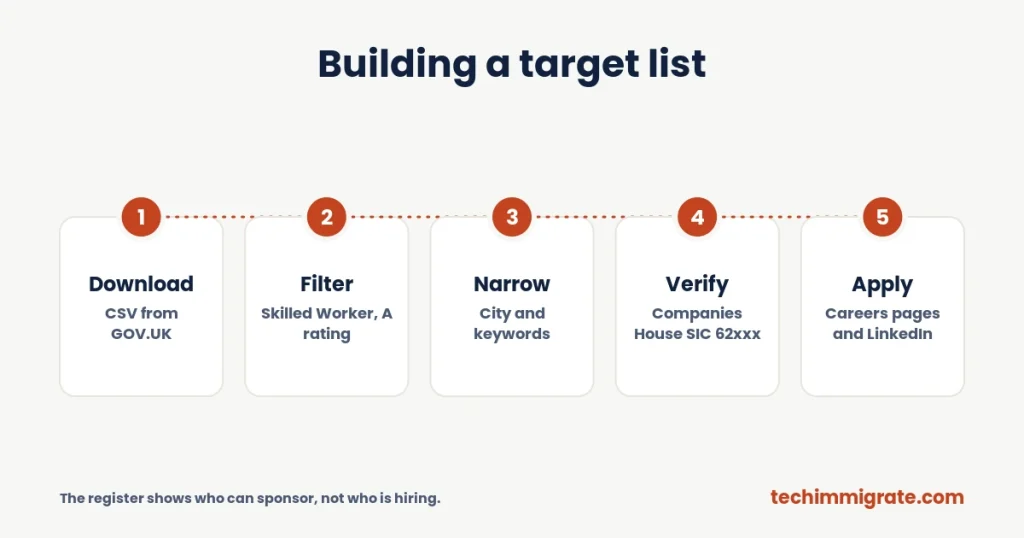
The register does not include industry codes, so you cannot filter directly for tech companies. Here are practical ways to narrow it down.
Search for names you already know
If you have a list of target companies, search the register for each one. Remember that the legal name may differ from the brand. A company known as a single word might be registered as that word followed by "Ltd", "Limited", "UK Ltd", "Technologies Ltd" or a completely different holding company name. If you cannot find a company, look up its legal name on Companies House first.
Filter by keywords
In your spreadsheet, filter the organisation name column for words commonly used in tech company names, such as "tech", "software", "digital", "data", "labs", "systems", "cloud", "AI" or "analytics". This will not find every tech company, and it will pick up some that are not, but it is a useful starting point.
Filter by location
Filter by town or city to focus on tech hubs such as London, Manchester, Cambridge, Edinburgh, Bristol, Leeds or Belfast. Combine this with keyword filters to build a shortlist.
Cross-check with Companies House
For any organisation on your shortlist, look it up on Companies House. Its records show the company's nature of business, using Standard Industrial Classification (SIC) codes. Codes in the 62000 range, such as 62012 for business and domestic software development and 62020 for IT consultancy, usually indicate a tech business.
Use LinkedIn and job boards
Once you have names, check their LinkedIn pages and careers sites for open roles. Many job boards let you filter for jobs that offer visa sponsorship, but always verify the employer on the register before you invest time in an application.
What Being on the Register Does and Does Not Mean
Being on the register means an organisation can sponsor workers. It does not mean:
- it is currently hiring;
- it will sponsor you, or anyone, for a particular role;
- it has a good track record as an employer;
- the role you are applying for meets the Skilled Worker rules.
Many companies hold a licence to sponsor a small number of specialists, or to keep existing staff, but do not sponsor new hires routinely. Large tech employers, consultancies and fintechs are more likely to sponsor regularly. Smaller start-ups may hold a licence but have a limited number of certificates to assign.
How to Approach a Sponsoring Employer
Once you have a shortlist, focus on making it easy for the employer to say yes.
- Apply for roles that clearly meet the rules. Check that the role is likely to be at degree level and that the salary is likely to meet £41,700 or the going rate for the occupation. For a programmer or software developer, the going rate is £54,700. New entrants, such as recent graduates, can qualify at 70% of the going rate, with a minimum of £33,400.
- Say early that you need sponsorship. Hiding it wastes everyone's time, and it is usually clear from your application anyway.
- Show you understand the process. Mention that you know the employer pays the certificate fee and Immigration Skills Charge, and that you are ready to provide English evidence and other documents quickly.
- Highlight skills that are hard to find. Employers are more willing to sponsor when they cannot easily recruit locally.
Our guide to new entrant Skilled Worker rules explains the reduced salary rules for early-career applicants.
What Sponsorship Costs the Employer
Understanding the employer's costs helps you see why some companies are cautious:
| Cost | Amount |
|---|---|
| Certificate of sponsorship | £525 per certificate |
| Immigration Skills Charge (large sponsor) | £1,320 per year |
| Immigration Skills Charge (small sponsor or charity) | £480 per year |
| Sponsor licence application | One-off, depending on size |
The Immigration Skills Charge rates above apply from 16 December 2025. For a 3-year visa at a large sponsor, the employer pays £525 plus £3,960, before any optional support with your own visa fee or health surcharge. These costs cannot be passed on to you. Our guide to Skilled Worker visa fees explains the full picture.
Spotting Fake Sponsors and Scams
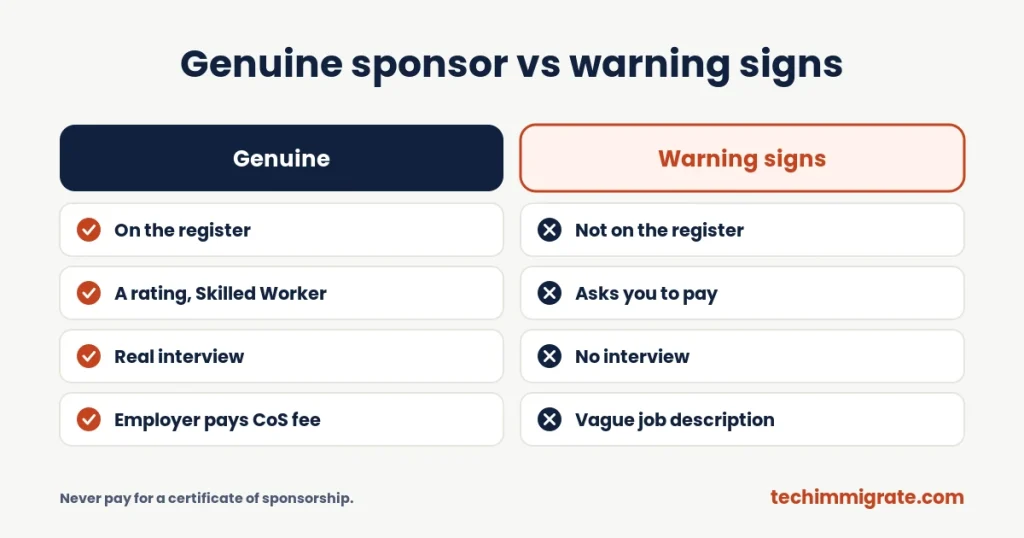
The register is your first line of defence against fake job offers. Warning signs include:
- the employer is not on the register, or is listed with a different name and location;
- you are asked to pay for a certificate of sponsorship or a "visa processing fee";
- there is no interview, or the interview is very brief and focused on payment;
- the job description is vague or does not match the employer's business;
- you are pressured to pay quickly into a personal account.
Even if an employer is on the register, a request for payment for sponsorship is a serious red flag. Genuine sponsors pay the certificate fee and Immigration Skills Charge themselves.
Building a Target List: A Worked Example
A data engineer applying from abroad wants to find sponsoring employers in Manchester.
- She downloads the register and filters the route column for Skilled Worker and the rating column for A.
- She filters the town column for Manchester and nearby towns, giving her a few thousand rows.
- She filters the organisation name for keywords such as data, tech, software, digital and analytics, reducing the list to a few hundred.
- She checks Companies House for SIC codes in the 62000 range, and removes companies clearly outside tech.
- She checks LinkedIn and careers pages for each remaining company, looking for open data roles.
- She ends up with 40 target employers, of which 12 have relevant open roles.
She tailors her applications to those 12, mentions her need for sponsorship upfront, and highlights her experience with the tools each company uses.
Spreadsheet Tips for the CSV
The register is large, so a few spreadsheet techniques make it much easier to work with:
- Freeze the header row so the column names stay visible as you scroll.
- Turn on filters for every column, then filter the route column first. This removes most of the rows you do not need.
- Use text filters such as "contains" on the organisation name column, rather than scrolling.
- Copy your filtered results to a new sheet before adding your own columns, such as website, LinkedIn page, open roles and application status.
- Remove duplicates after filtering, because organisations licensed for several routes appear more than once.
- Date your copy. The register changes often, so note the date you downloaded it and refresh it every few weeks.
If the file is too large for your spreadsheet program to open comfortably, use the online view to check individual names, or try a desktop program rather than a browser-based one.
Industries Within Tech That Sponsor Often
Sponsorship is more common in some parts of the tech economy than others. Based on hiring patterns and the occupations that meet the Skilled Worker rules, the areas that tend to sponsor most often include:
- Large technology companies with UK offices, which often have dedicated immigration teams;
- Financial services and fintech, where demand for software engineers, data specialists and security professionals is high;
- IT consultancies and system integrators, which sponsor both new hires and transfers through Global Business Mobility;
- Health tech and life sciences, especially for data and research roles;
- Universities and research institutes, for research software engineers and data scientists.
Early-stage start-ups sponsor less often, because sponsorship adds cost and administration, but some do for key hires. If a start-up wants you but does not have a licence, it can apply for one, although this takes time.
If Your Preferred Employer Is Not a Sponsor
Sometimes the company you most want to work for is not on the register. That does not always mean the door is closed. An employer can apply for a sponsor licence if it wants to hire you, but it needs to:
- be a genuine organisation operating lawfully in the UK;
- appoint people to manage sponsorship within the business;
- show it has HR systems that can meet sponsor duties, such as record keeping and reporting;
- pay the licence application fee.
The process usually takes several weeks, and it adds ongoing compliance work. Smaller companies may decide it is not worth it for a single hire, but some will, especially if your skills are hard to find. If you are already working with the company as a contractor or remotely, you are in a stronger position to make the case.
Questions to Ask in an Interview
If sponsorship is not mentioned early, ask about it politely. Useful questions include:
- Does the company hold a sponsor licence for the Skilled Worker route?
- Has the company sponsored people in similar roles before?
- Which occupation code would this role use, and does the salary meet the going rate?
- How long would the certificate of sponsorship run?
- Does the company support visa fees, the health surcharge or relocation costs?
- Who handles sponsorship internally, and how long does the process usually take?
Clear, confident answers are a good sign that the employer sponsors regularly and will manage the process well.
Sponsorship vs Global Talent
Finding a sponsor can be slow, especially for experienced professionals whose salary expectations are high or whose skills are specialised. If you have a strong track record in digital technology, the Global Talent visa may be an alternative. It needs no sponsor and no job offer. Instead, you need an endorsement from Tech Nation showing you are a leader or emerging leader in your field.
Once endorsed, you can work for any employer, freelance or start a business, and people endorsed under exceptional talent can settle after 3 years under the current rules. Our comparison of Global Talent vs Skilled Worker explains the trade-offs.
Keeping an Eye on Your Sponsor After You Start
The register is useful after you start work too. If your employer's licence is downgraded or revoked, your visa can be affected. Keep an eye on:
- news about your employer's sponsorship or compliance;
- any changes to your employer's rating on the register;
- communication from HR about sponsorship duties.
If your employer's licence is revoked, you will usually receive a letter shortening your visa, often to 60 days. Use that time to find a new sponsor or switch to another route.
Other Registers You May Come Across
The workers register is not the only list the Home Office publishes. There is also a register of licensed student sponsors, which lists universities and colleges that can sponsor Student visas. It is useful if you are planning to study in the UK first, but it does not tell you anything about work sponsorship. Make sure you are looking at the workers register when you search for employers.
You may also see third-party websites that repackage the register into searchable databases, sometimes with extra information such as industry or company size. These can be convenient, but they may be out of date, incomplete or behind a paywall. Use them for discovery if they help, but always confirm a sponsor's status against the official GOV.UK file before you rely on it.
How Long Sponsorship Takes Once You Have an Offer
Once an employer on the register agrees to sponsor you, the timeline is usually:
- A few days to a few weeks for the employer to assign the certificate of sponsorship, depending on how experienced its HR team is;
- A few weeks for you to prepare English evidence, tuberculosis test results if required, and other documents;
- Around 3 weeks for a decision if you apply from outside the UK, or up to 8 weeks from inside the UK.
Plan your notice period and start date around this. Most experienced sponsors build in 2 to 3 months between offer and start date for international hires.
Common Mistakes
- Searching for brand names only. Many companies are registered under their legal name.
- Ignoring the rating. B-rated sponsors usually cannot assign new certificates.
- Ignoring the route. A company licensed only for temporary worker routes cannot sponsor you as a Skilled Worker.
- Assuming the register means a job is available. It only shows who can sponsor.
- Trusting offers from unlisted employers. If the employer is not on the register, it cannot sponsor you.
- Paying for sponsorship. Never pay for a certificate of sponsorship.
The Home Office's official list of organisations that can sponsor workers, published on GOV.UK as a CSV file.
GOV.UK's update history shows it changing on most working days.
Filter the organisation name for tech-related keywords, filter by city, and cross-check with Companies House SIC codes and LinkedIn.
The sponsor is fully licensed and can assign certificates of sponsorship. B-rated sponsors usually cannot assign new certificates.
Not necessarily. The register shows who can sponsor, not who is hiring or willing to sponsor a particular role.
No. Genuine sponsors pay the certificate fee and Immigration Skills Charge themselves. Requests for payment are a warning sign.
Your visa will usually be shortened, often to 60 days, so you can find a new sponsor or switch to another route.
Use the Register as a Starting Point
The register of licensed sponsors is the most reliable way to check whether an employer can sponsor you. Use it to build a target list, verify every offer, and avoid scams. If finding a sponsor feels like the main barrier and you have built a strong profile in tech, consider whether Global Talent could be a better route. Our role-specific Global Talent guides explain what Tech Nation looks for.
How We Checked This Article
We checked the register's format, contents and update history against GOV.UK's register of licensed sponsors page in November 2026. Sponsor costs are from GOV.UK's sponsor guidance, with Immigration Skills Charge rates in force from 16 December 2025. Going rates and salary thresholds are from the Immigration Rules as reported at the time of writing.
Tech Immigrate is independent of the Home Office. This article is general information, not legal advice. Check GOV.UK before you apply.
We write practical guides for tech professionals applying for the UK Global Talent visa. Tech Immigrate is independent of Tech Nation and the Home Office, and our articles are general information, not legal advice. Rules and fees change, so always check gov.uk before you apply.