How to Get Your ILR Share Code (and Prove Your Status)
How to get a share code for indefinite leave to remain: signing in to UKVI, share code types, 90-day validity, employers, landlords, errors and NTL.

In this article
- Why You Need a Share Code With ILR
- What You Need Before You Start
- How to Get a Share Code Step by Step
- Types of Share Code
- How Long a Share Code Lasts
- Proving ILR to an Employer
- Proving ILR to a Landlord
- Travelling With Your eVisa
- Keeping Your Details Up to Date
- If You Have ILR in an Old Passport
- What the Checker Sees
- How Checks Change Once You Have ILR
- Share Codes for Banks, Mortgages and Universities
- Protecting Your UKVI Account
- When Things Go Wrong
- ILR Share Codes for Families
- A Worked Example: Starting a New Job After ILR
- A Worked Example: ILR in an Old Passport
- After You Become a British Citizen
- A Quick Checklist
- Common Mistakes
- Keep Your Proof Ready
- How We Checked This Article
Getting indefinite leave to remain (ILR) is a milestone, but it does not end the need to prove your status. Employers, landlords, banks and border staff will still ask you to show that you have the right to live and work in the UK. Since the UK moved to eVisas, the way to do that is with a share code: a short code you generate online and give to whoever needs to check your status.
This guide explains how to get a share code for your ILR, what each type of share code is for, how long it lasts, what to do if your details are wrong or you cannot sign in, and how people with older proof of ILR, such as a stamp in an old passport, can get an eVisa. It is written for people who have settled through work routes such as Skilled Worker and Global Talent, but the process is the same for everyone with ILR.
Key takeaways
- ILR is now usually proved with an eVisa, which you access through your UK Visas and Immigration (UKVI) account.
- To prove your status, you generate a share code online and give it to the checker with your date of birth. They do not need to see your eVisa itself.
- A share code lasts for 90 days, and you can reuse it as many times as you need before it expires.
- Share codes are specific to their purpose, such as proving your right to work or right to rent.
- Keep your UKVI account up to date, especially your passport details, so your eVisa is linked to the document you travel with.
- If your ILR is shown only by a stamp or vignette in an old passport, you can make a free no time limit (NTL) application to get an eVisa.
- If your eVisa shows wrong details, or you cannot get a share code, you can report the problem to UKVI.
Why You Need a Share Code With ILR
ILR means you can live in the UK without any time limit, but organisations still have legal duties to check your status:
- Employers must check that you have the right to work before you start a job.
- Landlords in England must check that you have the right to rent before a tenancy starts.
- Some public bodies, such as those handling benefits or student finance, may check your status.
- Carriers and border staff check that you can travel to and enter the UK.
With an eVisa, these checks are done online. You give the checker a share code and your date of birth, and they view your status on a government website. GOV.UK says you will not need to show them your eVisa.
The good news about ILR is that most checks only need to be done once. Because your status has no time limit, an employer does not need to recheck your right to work later, as long as they did the original check correctly.
What You Need Before You Start
GOV.UK says you need the details you use to sign in to your UKVI account. Depending on how you set up your account, that could be:
- your passport;
- a national identity card;
- a biometric residence card, valid or expired;
- an expired biometric residence permit (BRP);
- your UKVI customer number.
You also need access to the mobile phone number or email address you use to sign in, because you will receive a one-time code.
If you got ILR recently through a work route, you will almost certainly already have a UKVI account, because your eVisa was issued there. If you got ILR some time ago and only have a BRP, you will need to finish setting up your UKVI account if you have not already done so.
How to Get a Share Code Step by Step
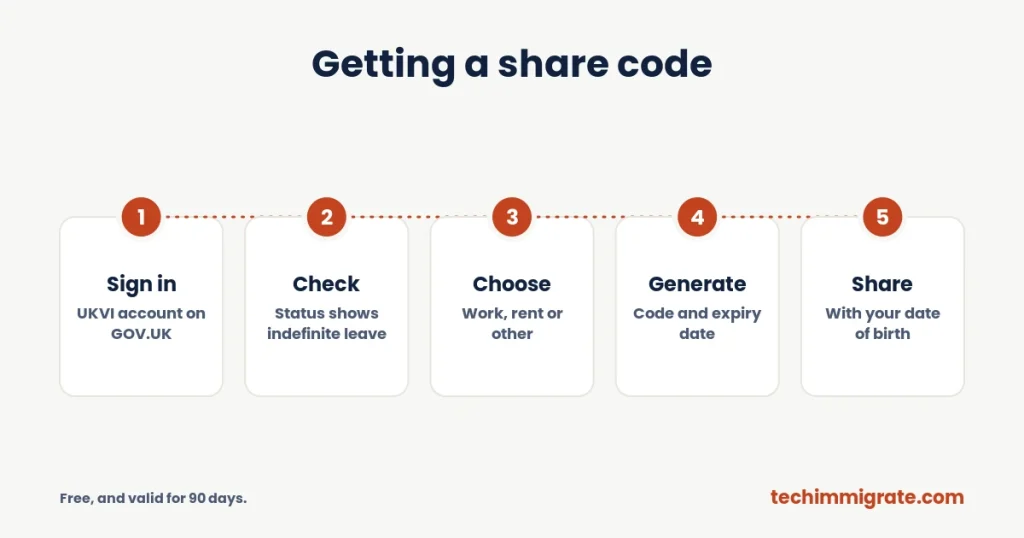
- Go to the official service. On GOV.UK, use the "View your eVisa and get a share code" service.
- Sign in to your UKVI account, using your identity document details and the one-time code sent to your phone or email.
- Check your details. Make sure your name, date of birth, photo and immigration status are correct. Your status should show indefinite leave.
- Choose why you need a share code. Common options include proving your right to work, proving your right to rent, or proving your immigration status for something else.
- Generate the code. The service will show a share code and the date it expires.
- Give the code to the checker, along with your date of birth. You can also download or email the code from the service.
The process usually takes only a few minutes once you are signed in. If the service is busy or you see an error, try again later rather than creating a new account, because duplicate accounts can cause problems with your record.
Types of Share Code
Share codes are tied to their purpose. A code you create to prove your right to work cannot be used by a landlord to check your right to rent, and the other way round. The main types are:
| Purpose | Who uses it |
|---|---|
| Prove your right to work | Employers, recruitment agencies |
| Prove your right to rent | Landlords and letting agents in England |
| Prove your immigration status for other reasons | Banks, public bodies, universities and others |
Make sure you choose the right purpose when you generate the code. If the checker tells you the code does not work, check whether it was created for the right purpose before assuming there is a problem with your status.
How Long a Share Code Lasts
GOV.UK says a share code lasts for 90 days. You can reuse it as many times as you need before it expires, or get a new one whenever you need. There is no limit on how many share codes you can generate, and there is no fee.
In practice, it is usually simplest to generate a fresh code each time someone needs to check your status. That way, you never hand over an expired code.
Proving ILR to an Employer
When you start a new job, your employer will ask for a right-to-work share code. They will use it, with your date of birth, to view your status online and confirm that you have indefinite leave. They will keep a record of the check.
With ILR, your employer usually only needs to check once. Unlike when you were on a Skilled Worker or Global Talent visa, there is no expiry date, so there is no need for a follow-up check.
If you are changing jobs soon after getting ILR, your new employer may still see your old visa conditions if your eVisa has not updated. Check your eVisa before you give the code, and report an error if your status has not changed to indefinite leave.
Proving ILR to a Landlord
If you are renting in England, your landlord or letting agent must check your right to rent before the tenancy starts. Generate a right-to-rent share code and give it to them with your date of birth. As with employers, a one-off check is usually enough for someone with ILR.
Right-to-rent checks are not required in Scotland, Wales or Northern Ireland, but landlords there may still ask for proof of identity.
Travelling With Your eVisa
When you travel, carriers such as airlines check that you have permission to enter the UK. With an eVisa, they check this digitally using the passport you travel on. That is why it is essential to keep your passport details in your UKVI account up to date.
GOV.UK says share codes can be used when you travel, but in most cases you will not need to give one, as long as your eVisa is linked to your passport. If you are travelling on a new passport, update your UKVI account before you travel.
It can help to carry a copy of a share code for proving your immigration status when you travel, in case there is a problem at check-in.
Keeping Your Details Up to Date
GOV.UK says you should update your UKVI account before getting a share code if:
- you have changed your name;
- you have changed your nationality;
- you need a new photo because you can no longer be recognised from the current one.
You should also update your account when you get a new passport, so that your eVisa is linked to the document you travel on. If your details are wrong, checkers may see the wrong information, or the check may fail.
If You Have ILR in an Old Passport
Some people have ILR shown only by a wet ink stamp or a vignette sticker in an old passport, or a Home Office letter. GOV.UK says getting an eVisa will not change your immigration status, and you can still use your physical document. But physical documents are becoming harder to use, and an eVisa makes status checks simpler.
To get an eVisa, you make a free no time limit (NTL) application. You need:
- a phone number and email address that you can use each time you sign in;
- the passport or travel document you used when you last entered the UK.
You will create a UKVI account as part of the application if you have a valid passport. Once the NTL application is approved, you will be able to access your eVisa and generate share codes like everyone else.
If you hold an expired BRP showing ILR, you do not need an NTL application. You can use the BRP details to set up or sign in to your UKVI account.
What the Checker Sees
When an employer or landlord enters your share code and date of birth, they see a summary of your status on a government page. It usually includes your photo, your name, the type of permission you hold and any conditions, such as restrictions on work. For someone with ILR, it shows that your permission has no time limit and that you can work and rent without restriction.
The checker does not see your full immigration history, your previous applications or your travel record. They see only what they need for the check they are making. This is one of the privacy benefits of share codes compared with handing over a physical document.
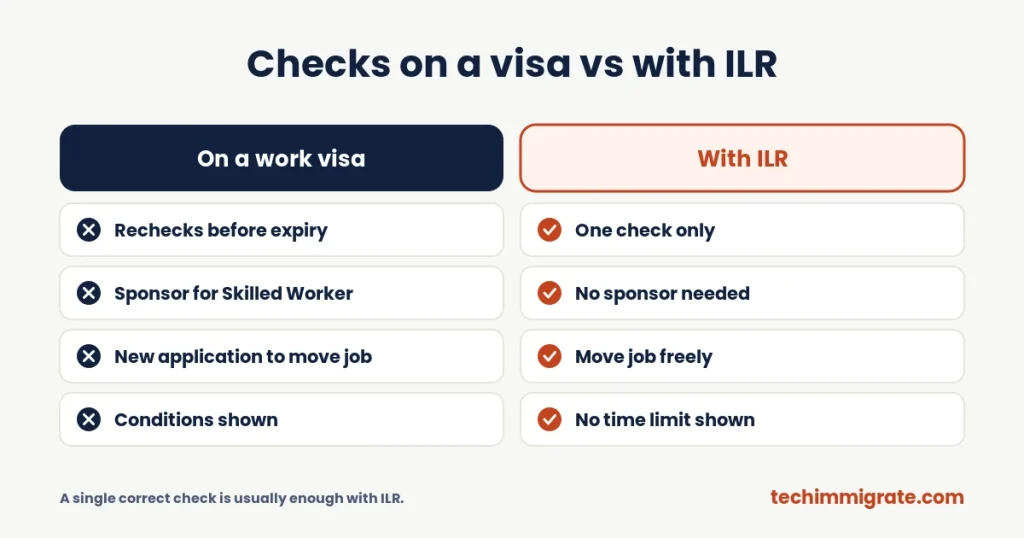
How Checks Change Once You Have ILR
| On a work visa | With ILR | |
|---|---|---|
| Right-to-work checks | Before you start, then again before your visa expires | Once, before you start |
| Sponsorship | Needed for Skilled Worker | Not needed |
| Changing employer | New application on Skilled Worker | No application needed |
| Right-to-rent checks | Before the tenancy, then again before expiry | Once, before the tenancy |
| Conditions shown | Work restrictions, sponsor, end date | No time limit |
The move from repeated checks to a single check is one of the most practical benefits of settlement, especially for people who change jobs or homes often.
Share Codes for Banks, Mortgages and Universities
You may be asked for a share code in situations beyond work and renting. Mortgage lenders, for example, sometimes ask to see proof of settled status, because it can affect the deposit or interest rate they offer. Universities and student finance bodies may check status to decide fee status or eligibility for loans. Some banks ask when you open an account.
For these checks, choose the option to prove your immigration status for other reasons. If an organisation is unfamiliar with share codes, point them to the GOV.UK page for checking someone's immigration status. Many organisations are still adjusting to eVisas, and a little patience usually resolves the issue.
Protecting Your UKVI Account
Your UKVI account is the key to your status, so treat it like a bank account:
- use a phone number and email address you control long term, not a work email you may lose when you change jobs;
- update your contact details immediately if they change;
- never share your sign-in details or one-time codes with anyone, including people claiming to be from the Home Office;
- only give share codes to organisations that genuinely need to check your status;
- be cautious of emails or messages asking you to sign in through a link, and go to GOV.UK directly instead.
If you think someone has accessed your account, contact UKVI through the official channels on GOV.UK.
When Things Go Wrong
Your eVisa shows the wrong details
If your name, date of birth, nationality, photo or status is wrong, GOV.UK says you should report an error. Do not give share codes to employers or landlords until the error is fixed, because they will see the incorrect information.
You can view your eVisa but cannot get a share code
This is also something you can report as an error through the eVisa service.
You cannot sign in
Use the UKVI account recovery help. This is often needed if you have changed your phone number or email address, or no longer have access to the identity document you used to set up your account.
Other problems
GOV.UK points to UKVI webchat and eVisa support videos for other questions.
ILR Share Codes for Families
Each family member has their own eVisa and their own UKVI account, including children. If your partner and children got ILR at the same time as you, each of them needs their own share code when their status is checked. Parents or guardians usually manage children's accounts.
This matters when a partner starts a new job, when a teenager applies for a part-time job, or when a child applies to university. Make sure everyone in the family can access their account.
A Worked Example: Starting a New Job After ILR
A cloud engineer got ILR in October 2026 after 5 years on a Skilled Worker visa. In January 2027, he accepts a job with a new employer.
- He signs in to his UKVI account and checks that his eVisa now shows indefinite leave to remain.
- He generates a right-to-work share code.
- He emails the code and his date of birth to his new employer's HR team.
- HR checks his status online, sees indefinite leave, and records the check.
Because he has ILR, his new employer does not need a certificate of sponsorship and does not need to recheck his status later.
A Worked Example: ILR in an Old Passport
A data analyst got ILR as a child in 2009, shown by a vignette in a passport that has since expired. She now has a new passport and wants to start a job.
- She makes a free no time limit application, creating a UKVI account with her new passport.
- She attends an appointment to give biometrics.
- Once approved, she accesses her eVisa and generates a right-to-work share code.
While the application is pending, she can still rely on her old document in some situations, but having an eVisa makes the job check straightforward.
After You Become a British Citizen
If you go on to become a British citizen, you will no longer need share codes to prove your right to work or rent. Instead, you prove your status with a British passport or, in some cases, a certificate of naturalisation alongside official photo ID. Employers and landlords carry out a manual document check rather than an online check.
Until your British passport arrives, keep your UKVI account active. Some organisations may still accept an eVisa check while your citizenship documents are being processed, but rules on what counts as acceptable proof can differ, so ask the employer or landlord what they need.
Most people with ILR who plan to stay in the UK long term eventually apply for citizenship. Our guide to moving from ILR to British citizenship explains the timeline, requirements and fees.
A Quick Checklist
Before you need to prove your status, make sure you:
- can sign in to your UKVI account;
- have access to the phone number and email linked to it;
- have checked that your eVisa shows indefinite leave;
- have updated your passport details if you have a new passport;
- know how to generate a share code for work, rent and other purposes.
Common Mistakes
- Choosing the wrong purpose. A right-to-rent code will not work for an employer.
- Giving an expired code. Generate a fresh code each time.
- Not updating your passport. Your eVisa must be linked to the passport you travel with.
- Giving codes before fixing errors. Report wrong details first.
- Using unofficial websites. Only use the official GOV.UK service to get a share code.
- Forgetting family members. Each person has their own eVisa and share code.
Sign in to the "View your eVisa and get a share code" service on GOV.UK, choose why you need the code, and generate it.
90 days. You can reuse it as many times as you need before it expires.
No. Getting a share code is free.
A right-to-work share code and your date of birth.
Usually not. Because ILR has no time limit, a correct initial check is usually enough.
Your status is still valid, but you can make a free no time limit application to get an eVisa, which makes proving your status easier.
Report an error through the eVisa service before giving share codes to anyone.
Keep Your Proof Ready
Once you have ILR, proving your status should be quick and painless. Keep your UKVI account secure and up to date, generate share codes for the right purpose, and fix any errors early. If you are still on the path to settlement in tech, our role-specific Global Talent guides explain how to build an application Tech Nation will endorse, and our guide to the UK eVisa covers how eVisas work on every route.
How We Checked This Article
We checked share code rules against GOV.UK's view and prove your immigration status page, and the no time limit process against GOV.UK's eVisa settlement page and ILR guidance, in November 2026.
Tech Immigrate is independent of the Home Office. This article is general information, not legal advice. Check GOV.UK for the latest guidance.
We write practical guides for tech professionals applying for the UK Global Talent visa. Tech Immigrate is independent of Tech Nation and the Home Office, and our articles are general information, not legal advice. Rules and fees change, so always check gov.uk before you apply.